
Syncthing vs. iCloud
This is what happens when an OpenBSD‑minded admin tries to fix “normal” users’ privacy problems.
The privacy-first instinct
There’s a particular kind of optimism that comes with being an OpenBSD user. You believe that simple, well-designed systems can solve real problems - securely, transparently, and without unnecessary compromise. Sometimes, that belief collides head-on with the way most people actually use technology.
Recently, a family member approached me with a reasonable request: they wanted to share sensitive documents - health records - via Apple iCloud. That immediately raised a red flag for me. Not because iCloud is uniquely bad, but because it represents a trade-off: convenience in exchange for trust in a black box. For deeply personal data, that didn’t sit right.
So I went looking for alternatives.
My first thought was Nextcloud. It’s the usual go-to in the self-hosting world: feature-rich, widely adopted, and capable of replacing a whole ecosystem of cloud services. But it’s also heavy. It requires maintenance, a web stack, and a tolerance for complexity that not everyone has - or should have to deal with.
Then I remembered Syncthing.
Syncthing: minimal, auditable, and robust
Syncthing is refreshingly different. It’s a peer-to-peer file synchronizer written in Go, with a relatively small codebase (v1.30: ~90K). No central server, no accounts, no hidden intermediaries - just devices talking directly to each other. From a simple and secure perspective it feels better: minimal, auditable, and robust.
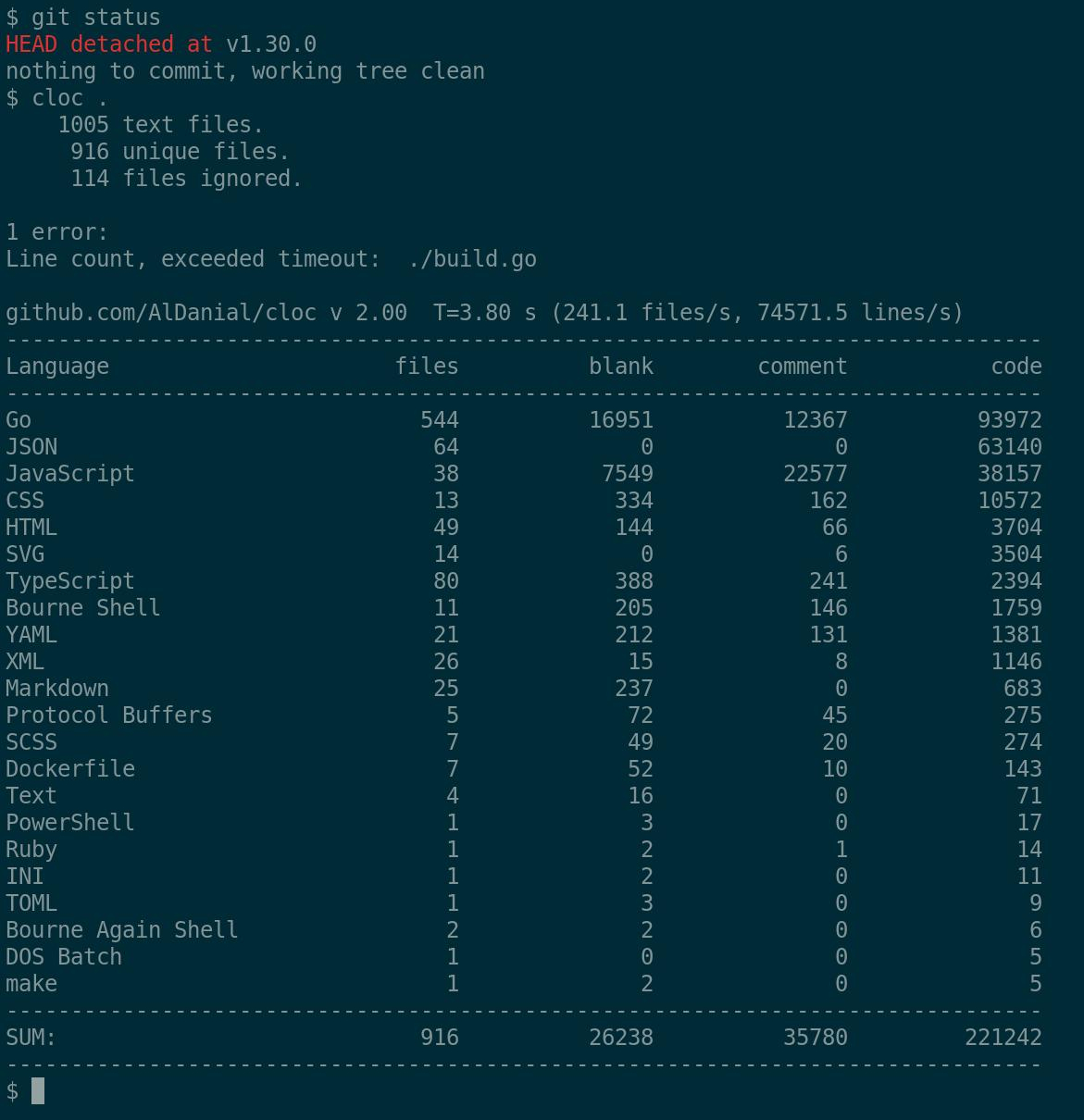
Installing it on OpenBSD - both as server and client - was straightforward. The ports system delivered, as usual. Configuration required a bit of reading, but nothing unreasonable.
A controlled hub‑and‑spoke setup
To avoid leaking metadata or relying on third‑party infrastructure, things like global discovery, relay servers, and other external coordination mechanisms are disabled. A hub‑and‑spoke topology is chosen: data is synchronized via a central server, where it is stored encrypted at rest using Syncthing’s untrusted device support: According to documentation file and folder names are encrypted using AES‑SIV‑128, file contents using XChaCha20‑Poly1305. While this setup sacrifices some of the benefits of a true peer‑to‑peer mesh, it keeps everything local, predictable and under control.
On macOS, the installation was just as smooth. So far, everything was lining up: a simple, secure, peer-to-peer solution that avoided the pitfalls of centralized cloud storage.
And then reality stepped in.
When convenience meets reality
The user already had iCloud enabled - fully. Desktop, Documents, everything. Their entire workflow depended on seamless synchronization across devices: laptop, phone, tablet. That convenience wasn’t a luxury, it was the baseline expectation.
The idea of carving out a single “private” folder and excluding it from iCloud sounds simple in theory. In practice, it’s anything but. Apple doesn’t make selective exclusion particularly intuitive, and any workaround feels fragile or confusing to a non-technical user.
From their perspective, my solution introduced friction: another app, another concept, another set of rules about where files can and cannot live.
From my perspective, their setup quietly undermined the very privacy they were trying to preserve.
And that’s where the real tension emerged - not technical, but philosophical.
We started discussing trade-offs. Privacy versus convenience. Transparency versus integration. Control versus trust. These are not new debates, but they become very concrete when tied to something as personal as health records.
Smaller details, bigger friction
At the same time, smaller - but telling - details added to the complexity. Folder names starting with emoji, for example, which are charming in a graphical interface but awkward (and sometimes painful) to handle from a terminal. Or the preference for Apple’s Pages format, which ties documents to a proprietary ecosystem and limits interoperability.
None of these choices are “wrong.” They make perfect sense within the user’s world. But they collectively form a system that resists the kind of simplicity and openness I was trying to introduce.
The right solution, the wrong fit
In the end, I reached a limit.
Not a technical limit - Syncthing works beautifully. But a human one. There’s only so far you can push someone to change their habits, especially when those habits are reinforced by tools designed to be effortless and invisible.
I offered a solution that was private, secure, and, in my view, reasonably simple. But it didn’t align with the user’s expectations of how technology should behave.
And that’s an important lesson.
Good technology isn’t just about correctness - it’s about fit.
Kuandu Systems
As much as we might prefer clean, open systems, most people live in ecosystems optimized for convenience. Those ecosystems are sticky by design. They remove decisions, hide complexity, and in doing so, quietly reshape what users consider “normal.”
Walking away from that - even partially - feels like a downgrade, no matter how strong the privacy argument is.
So yes, it’s a bit disappointing. There’s a sense of having built the “right” solution that no one asked for.
But it’s also clarifying.
Good technology isn’t just about correctness - it’s about fit. And sometimes, the gap between those two is wider than we’d like to admit.
~
fg. 2026-03-24